Showing posts with label photoshop. Show all posts

Thursday, November 24, 2011

Photoshop Photo lesson 1: Levels

Okay so I'm going to make these beginner photoshop lessons, quick and simple
One because I'm lazy and two because I lack technical photoshop knowledge :P

LEVELS!
Levels are my most favourite 'adjustment' in photoshop. Adjustment is just the name photoshop gives to a group of well, err, adjustments to help you make your photos pretty.

I should also quickly note I have photoshop CS4 and to get to adjustments I make sure I have my 'basic workspace' in place
Windows (top toolbar) -> Workspace -> Basic


This then sets up some icons on the right hand side of my photoshop screen and the adjustment icon is the circle which is half white half black!
Photoshop screencap showing the black and white circle in the right hand column

Still with me? I just wanted to mention it cause there are a few ways to get to the adjustments window, google it, if it's a bit different in your photoshop!

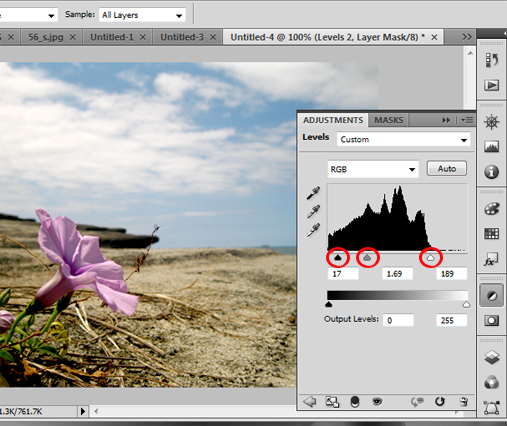
So after you have clicked on the black and white circle adjustment icon, you'll need to locate 'levels' which is the histogram icon or the mountain-esque icon for the silly like myself! Clicking on this will bring up the adjustment/mask window which you can see above :)

Now in levels there are a billion and one things you can do! Heck there is even a simple "Auto" button, that corrects everything with a click on one button, like you can see below...


But I prefer to have more control, so I just move some triangles which gets the 'freestyle' fee result :P

The screencap is after i've moved the triangles to get the best result

You can see three red circles I've drawn onto the screen cap, when you first open levels these triangles are perfectly spaced out, the black triangle to the far left (deals with the shadows of your image) the grey in the middle (deals with the mid tones) and the white(deals with the highlights). Now the actual histogram is important but I pay no attention to it and just move the triangles until my photo looks nice!

THE END....quick and simple!

The best way to learn is to understand the basics, google lots and then play around with it yourself, photoshop is amazing and I'm constantly learning!


read more "Photoshop Photo lesson 1: Levels"

Wednesday, November 16, 2011

Edited Photos vs Unedited Photos

There are four main groups of people when it comes to photography
(vastly generalised by the way by me!)

1) People who take/appreciate photos but don't know/care too much about the process
2) Photographers who grab the photo straight from the camera as the end result
3) Photographers who edit their photos
4) Photographers who edit their photos lots

Okay a quick background on my thoughts, I use to be a purist for everything!
People who made art on the computer didn't really class as artists to me. I was introduced to photoshop in Uni did a 360 and since then I've seen it as a tool to improve your creativity. I also appreciate those who can make something beautiful just by using it! I now use photoshop to clean up my art and I feel the end result is a step up from the original, a bit of collagen to the lips so to speak.

Okay getting back to photography. So ever since I started to get obsessed with taking photos, probably in 2005 when I went to Japan, I've edited my photos in photoshop

I use to and still do play around with the following main adjustments in photoshop:
Brightness and Contrast
Levels
Vibrancy
Hue/Saturation
Colour Balance
Selective Colour

It's taken me years to grasp many elements of photoshop and I felt that my post production photos were a result of me taking a fairly good picture and then having the skills to bring out the best of the photo, the whole process a sort of labour of love

This is what I do to about 90% of my photos, looking at it now I feel I'm crazy, but I can see the difference and plus inside of me is some weird obsessive compulsiveness to make things better :P (Click if you want to see it bigger)

Anyway fast forward to just recently and I'm hearing a lot about actions...actions? Huh? What?
Now actions are basically a list of commands that are set in place so when you hit a button, photoshop applies them your photo. Suddenly I realised that all this time I put into each photo could simply be done with a hit of a button. I think I got a little peeved, I started looking at all these amazing photos and wondered if they just hit a button too?

I've mellowed though, heck I even use actions now too :) They save time and can give your photos some really nice qualities! Just google “photoshop actions” and you'll spend hours finding some great ones!

This photo was taken with my digital slr and looked a bit boring so I went to town on it...actioned to the max!


Since using film (which consist of around 80% of the photos you see on my blog), I don't feel the need to do too many crazy edits because film is already rad! I usually lighten it a bit or make it a tad less blue, or remove some of the dust that settled upon the film, during the scanning process but I love the effect of film that I don't alter it too much.  I also don't mind people adding a film effect onto their digital photos, like instagram, I think it's cool, but I'm not cool enough to have an iphone yet :P

Okay so how I see it is... *deep breath* isn't applying some tricks in photoshop to your point and shoot camera the same as having thousands of dollars of photo equipment to take a good photo off the bat? (I know there are many greys in between but I'm trying to make a point :P) I really think it's silly to get caught up in the edited or not edited debate. I think to call yourself a true purist you would have to have your eye functioning as a camera! AND...whats even a good photo? Ahh a whole other debate

Photos at the end of the day serve many purposes but I like the fact that they are just a form of creativity!

This photo was from our ginger factory ride trip, I think either Ben or I were forced to use our point n shoot's built in flash...arghhh horrible! So again I went to town, lots and lots of actions made this post edited shot!


Lastly an unedited shot! Now it could of possibly has some colour alterations in photoshop but truth be told it was just a combo of, my camera, the film, the light and the camera settings. So it's a purist's work but the end result is slightly unreal.  I think it's a more fun when you tweak reality whichever way you go about getting to it :P


I wish people weren't afraid to say there photos were edited for fear that they would become less worthy.  We should all be able to just like pretty pictures :)

THE END


read more "Edited Photos vs Unedited Photos"